
In the field of training and education, the paperless attendance sheet plays a crucial role. This modern technology replaces traditional attendance-tracking methods by using digital systems to record learner participation in courses or training sessions. The main advantage of this approach lies in its accuracy and efficiency.
By digitising the attendance process, it eliminates the common errors associated with manual methods, while saving considerable time for teachers and trainers. They can therefore focus more on teaching and interacting with learners, rather than on administrative tasks.

A paperless attendance sheet — also known as a digital attendance sheet or digital sign-in sheet — is a digital document that records the presence of participants during training sessions, meetings or professional events. Traditionally in paper form, it has evolved into more practical and secure digital versions.
In practice, a paperless attendance sheet takes the form of a digital interface displaying the list of participants with spaces for electronic signatures or attendance marks. Designed to be intuitive, it can include features such as handwritten signature capture on a touch screen, PIN entry, QR code scanning or identity verification by email.
These digital signatures, using online tools or dedicated applications, enable easy and accurate attendance tracking, providing greater reliability and better data management. They also contribute to environmental efforts by significantly reducing paper use.
The paperless attendance sheet, within its legal framework, is defined as a digital method for documenting and validating attendance in various contexts such as training sessions or professional meetings.
This definition sits within a legal history that has seen attendance-justification standards evolve. Once limited to traditional paper methods, legislation has progressively recognised the evidential value of digital signatures and confirmations. This shift reflects an adaptation to technological advances, allowing greater flexibility and better data integrity.
The history of these legal developments shows how technology has influenced and improved processes, ensuring that the paperless attendance sheet is not only practical, but also legally compliant and recognised for its accuracy and reliability.
The attendance sheet must be signed by all participants in the event, meeting, training session or any other activity for which it is used.
The digital signature of participants confirms their attendance and contributes to the keeping of accurate records for various purposes: verifying attendance, tracking participation for certified training programmes, or managing human resources. In certain cases, particularly at professional events or training sessions, the organiser or trainer may also be required to sign the sheet to validate the participants' attendance.
This practice ensures the accuracy and integrity of attendance evidence, which is essential for regulatory compliance, evaluation and future planning.
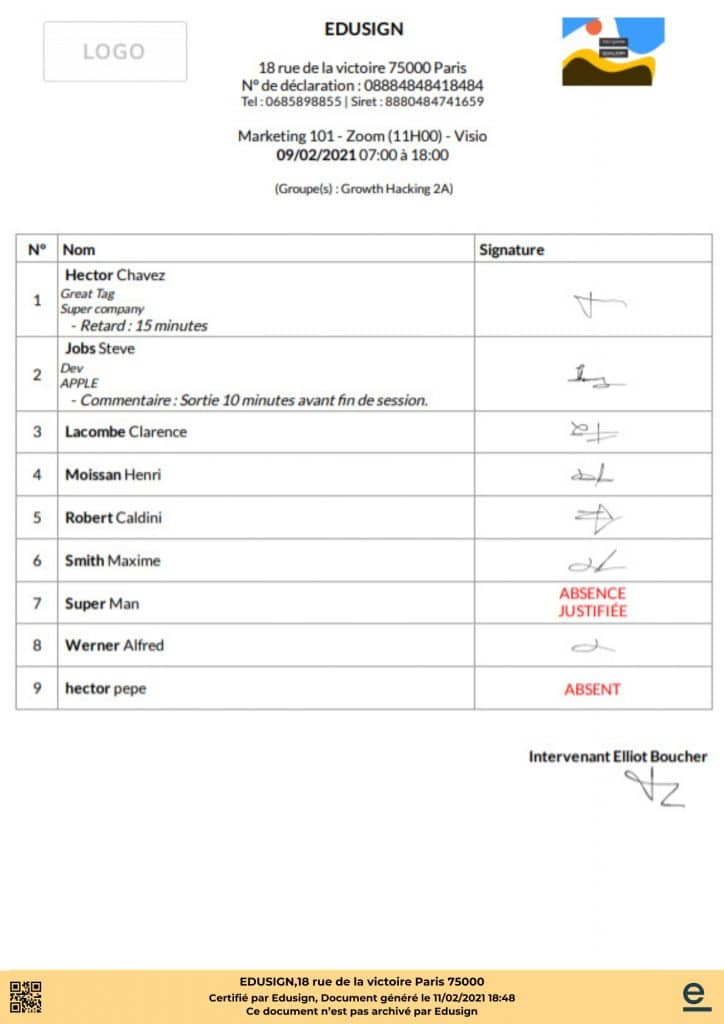
Using a paperless attendance sheet represents a major step forward compared to traditional paper methods, primarily due to its multiple benefits.
Unlike paper attendance sheets, which are often vulnerable to loss, damage and human error, the digital version offers a more reliable and efficient solution. Online sign-in enables attendance confirmation via digital devices, ensuring quick and secure verification.
Still managing attendance manually?
Edusign automates attendance tracking and generates signed sheets in one click.
Before switching to a paperless attendance sheet, many training organisations still use Word, Excel or PDF formats. Here is why these solutions fall short:
The Word format is noted for its editing flexibility, but the need to modify it for each use can become impractical for regular, efficient attendance sheet management. Each session requires the document to be manually recreated or adapted, which is time-consuming and error-prone.
Excel or Google Sheets are not recognised by quality auditing bodies. Regulatory authorities and funding bodies generally do not accept them as official proof, which can cause major problems during audits.
The PDF format is secure and universal, offering optimal results in terms of legal proof. However, it can be less practical for remote circulation and managing changes. It remains an ideal output format, but not a collection tool.
A solution such as Edusign combines the ease of digital collection with the automatic generation of sheets in PDF format, compliant and ready for audits. It is the optimal synthesis between everyday practicality and regulatory compliance.
To get a paperless attendance sheet signed online, use a system that supports electronic signature such as Edusign. Here is the 4-step process:
This method ensures automatic, secure and real-time updating of attendance records.
Edusign is the reference solution for training organisations wishing to move to paperless attendance sheets. Here is what makes the solution particularly well suited:
More than 5,000 organisations already trust Edusign, including SKEMA Business School, the Red Cross, Veolia and Vinci Energies.

No, regulatory authorities and funding bodies generally do not recognise them as official proof, which can cause problems during audits.
The PDF format is secure and universal, offering optimal results in terms of legal proof. With Edusign, attendance sheets are automatically generated in PDF after each session.
Edusign offers a free 14-day trial, with no credit card required, and full access to all features. Getting started is quick thanks to an intuitive interface and dedicated support.
Yes. Legislation recognises the evidential value of electronic signatures. Paperless attendance sheets generated by Edusign comply with the requirements of funding bodies, regulatory authorities and quality certification bodies.
A paperless attendance sheet is only as strong as its signature: read are electronic signatures legally binding in education? for the eIDAS levels and the evidence to keep.
How does a digital attendance sheet save time for training organisations and schools? Discover the benefits of dematerialised attendance tracking and online signing.
Paperless digitalisation replaces physical documents with digital files. Discover how to implement it, its advantages, and how electronic signatures and document management tools…
Most organisations still lose valuable time with paper documents. Discover how digitalisation in training improves productivity, traceability and efficiency.